
Same character on every page: how to keep your child recognizable in an AI children's book
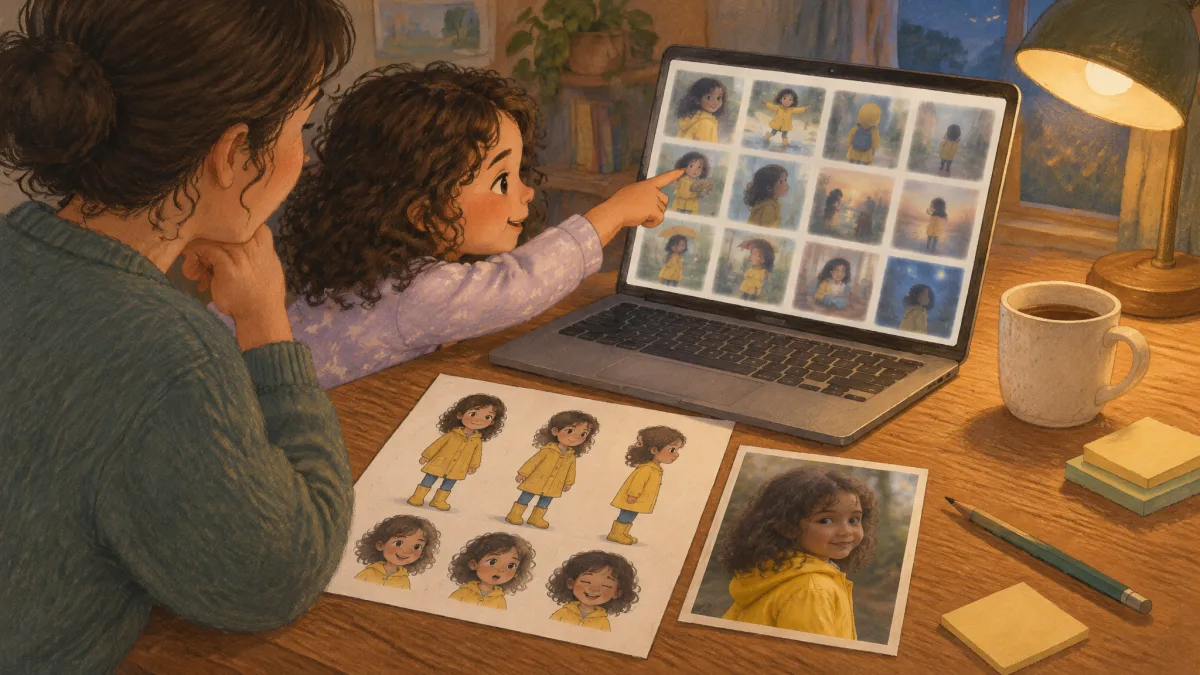
To keep your child recognizable on every page of an AI children's book, build one character first, then draw every page from it: a character sheet made from a clear photo, a fixed written description pasted into every prompt, and one reference image fed to a tool built for consistency (Neolemon, Leonardo's Character Reference, Midjourney's Omni Reference, or ChatGPT and Gemini with the photo attached). Even then, expect to check each page and redraw some of them, because no tool promises a perfect likeness. If you would rather not run that loop yourself, a ready-made service draws the child from your photos and lets you fix pages before printing.
This is the hands-on method. If you are still deciding whether a chat assistant can write and illustrate the whole book, start with our honest comparison of ChatGPT, Gemini and Claude; this article picks up where that one stops, at the face.
Why the face changes from one page to the next
An image generator does not remember the child it drew on page 3 when it draws page 4. Each picture is made fresh from your words and whatever image you attach, so small differences pile up: the curls loosen, the eyes change colour, the freckles move, the five-year-old looks eight on the cover and three on the last page. The makers say so themselves. OpenAI's image documentation notes that its model "may occasionally struggle to maintain visual consistency for recurring characters" across generations, and Leonardo writes that its Character Reference "does not guarantee a perfect replica of a person".
Two things make it harder for a children's book than for a one-off picture. A child's face has few strong features to hold on to (no beard, no glasses, often no distinctive nose), so a generic "cute child" face creeps back in. And a book asks for the same child running, sleeping, seen from behind and next to a sibling, which is exactly where the likeness slips.
How character reference tools work
All the consistency tools rely on the same idea: you give the tool a reference image of the character, and every new picture is steered towards it, while your prompt changes the scene. What differs is how much control you get and how much of the book the tool handles.
Neolemon: a character you build once
Neolemon is built around children's book illustration. You "describe your character, upload a photo, or bring your own art", and the site says it locks the character in and reuses it across every pose, scene and page. You change the pose, expression, outfit or background with words, and you can combine several characters in one scene. It is the closest thing to a dedicated character workshop, and you still lay out and print the book yourself.
Leonardo: Character Reference with a strength setting
In Leonardo you attach one image as a Character Reference and pick a strength. The documentation describes the trade-off plainly: Low gives the most flexibility "at the cost of resemblance", High "the best resemblance" but less freedom. Only a single image can be used at a time, the help page warns it may not work well on pets, and Leonardo states it is not intended as a face swap.
Midjourney: Omni Reference
Midjourney's V7 has Omni Reference, which Midjourney says can duplicate much of what its older character reference did. You add one reference image and set a weight with --ow (100 by default; Midjourney suggests around 400 to keep a face or clothing, and warns that higher values can make things worse). Midjourney itself calls the feature a bit experimental and two characters from one reference "somewhat untested", which matters if your book has siblings.
ChatGPT and Gemini: the photo in the chat
With a chat assistant, the reference is simply the photo or character sheet you attach to the conversation. You ask for each page in turn and attach the reference again when the face starts to drift. Google says its Gemini image model is designed to keep a person's or pet's look the same in every image, and OpenAI's own documentation, quoted above, is more cautious about recurring characters. Both are free to try, and both leave the layout and printing to you.
The do-it-yourself method, step by step
Whichever tool you pick, the method is the same. Budget an evening for the character and another for the pages.
- Pick two or three good photos. Face fully visible, normal daylight, no sunglasses, no heavy filter, one photo from the front and one slightly turned. Recent photos only: a child changes fast, and a photo from last year gives you last year's child.
- Write the character card. Three or four lines you will paste, word for word, into every prompt: age, hair (colour, length, curls), eye colour, skin tone, one or two distinctive details (gap in the teeth, glasses, a mole), and one fixed outfit. "Mia, 5, shoulder-length dark brown curls, brown eyes, light olive skin, a gap between her front teeth, yellow raincoat, red boots." The outfit is your best anchor: a child who always wears the same raincoat is recognised even when the face wobbles.
- Fix the style in one sentence too. "Soft watercolour picture-book illustration, warm palette, visible paper texture." Paste it into every prompt unchanged. Changing the style words between pages changes the face as well.
- Make a character sheet before any story page. Ask for the character from the front, three-quarter view and side, full body, with three expressions (happy, surprised, sleepy) on a plain background. Generate until one sheet really looks like your child, then use that sheet, not the original photo, as the reference for every page. It is already in the book's style, so the tool has less to invent.
- Draw the pages in one session, in order. Same tool, same reference, same strength or weight, same character card, same style sentence. Describe only what changes: the place, the action, the light. Keep a note of the setting that gave you the good sheet.
- Keep scenes simple where it matters. Close-ups and medium shots hold the face better than tiny figures in a big landscape. Put the hard angles (from behind, far away) on pages where the face does not need to be read.
- Add the other characters one at a time. A sibling or grandparent gets their own card and sheet. Draw them together only once both are stable on their own, and check that the two have not swapped hair or clothes.
- Check, then redraw. Run the checklist below on every page and redraw the ones that fail. Expect to redraw a good share of them; it is normal, not a sign you did it wrong.
What to check on every page
Lay all the pages side by side (a contact sheet or a slideshow on the computer) rather than judging them one at a time. Drift is invisible from one page to the next and obvious across twelve.
- Face shape and age: the same roundness of cheeks, the same apparent age from cover to last page.
- Hair: colour, length, curl, fringe or parting, on the same side.
- Eyes and skin: eye colour, skin tone under different lighting (night scenes are where skin tone shifts most).
- Distinctive details: glasses, freckles, a gap in the teeth, a birthmark. Glasses that appear and disappear are the most common slip.
- Outfit: same colours, same boots, same hat, unless the story changes them on purpose.
- Proportions: height next to a parent or sibling, the size of the dog, the length of the legs.
- Who is who: two siblings who have traded hair colour, or a grandparent who has become younger.
- Hands and small objects: extra fingers, a teddy that changes species, text that has appeared on a sign.
- The style itself: one page that has gone glossy or photo-like among watercolour pages stands out more than a small face change.
The final test is the one that counts: show three random pages to someone who knows your child, without saying who it is. If they name the child on all three, the book works.
Tools compared on what a parent sees
| Starts from your photo | How the face is held | Fixing a page | What you end up with | |
|---|---|---|---|---|
| Neolemon | Yes, or a description or your own art | Character built once and reused, per Neolemon | Change pose, outfit or background with words | Illustrations to lay out and print yourself |
| Leonardo (Character Reference) | Yes, one image at a time | Low, Mid or High strength, no guaranteed replica | Generate again | Illustrations to lay out and print yourself |
| Midjourney (Omni Reference) | Yes, one image | --ow weight, described as experimental | Generate again | Illustrations to lay out and print yourself |
| ChatGPT or Gemini | Yes, attached in the chat | Re-attach the reference and repeat the description | Ask for a new version in words | Illustrations to lay out and print yourself |
| Ready-made service (Looma as the example) | Yes, one photo per character, up to five | Each character drawn once from the photo, then on every page | Fix an element or redraw any picture, change a character once for the whole book | A finished book: ebook, and a hardcover if you want one |
The ready-made alternative
The do-it-yourself route is satisfying and free or nearly so, and the character sheet you make is yours to reuse. It also costs two evenings, a layout step (see our Canva tutorial for that part) and a print order. The alternative is a service that does the character work for you. They come in two kinds, and it is worth knowing which one you are buying.
- A character who looks like your child, in a set story. Publishers such as Mr Tales make printed-to-order hardcovers with your child's name and a character who looks like them. Ask how that character is made, since it decides how closely it resembles your child.
- A character drawn from your photos. The service draws the child from the photo you upload and keeps that character through the book, so the likeness work in steps 1 to 5 above is done for you, and you are left with the checking.
Whichever you choose, ask to see the whole book, not only the cover, before anything is printed, and check whether you can fix a page that is not right.
Looma in 1 minute
FAQ: keeping the same character on every page
Which AI tool is best for character consistency in a children's book?
For doing it yourself, a tool with a dedicated character feature (Neolemon, Leonardo's Character Reference, Midjourney's Omni Reference) gives you more control than a plain chat, and ChatGPT or Gemini with the photo attached is the free way to start. None of them promises a perfect likeness, so the method (character card, character sheet, fixed style, page-by-page check) matters more than the tool.
Should I use my child's photo or a drawn character sheet as the reference?
Start from the photo to make the character sheet, then use the sheet for every page. The sheet is already in the book's style, so each page needs less reinterpretation and the face moves less.
How do I keep two siblings consistent in the same picture?
Build each child separately with their own card and sheet, draw them together only once both are stable, and describe them in the same order every time. Check on every page that hair and clothes have not swapped between them. This is the hardest case for every tool.
Is it safe to upload my child's photo to these tools?
Read each tool's privacy terms before uploading, check whether images you generate are public by default, and prefer a photo with no school logo or address in the background. A tool that says clearly how long it keeps photos and what it uses them for deserves more trust than one that is vague.
Why does my child look older on some pages?
Image models drift towards an average child for the description, and close-ups of a young face often come out older. Put the exact age in the character card, keep the same outfit, and redraw the pages that age the child; side by side, they are easy to spot.
Where Looma fits
Looma is one of the ready-made services, of the second kind. Each character is drawn from a photo you upload (up to five characters, a photo for each), fully redrawn in the art style you choose rather than a face pasted onto a template, and the story is written around them. You pay €3.99 for the ebook up front, then read the whole book: in the editor each character sits next to the photo it came from. If a page is not right, you can fix one element in it or have it redrawn; if the character itself needs a change ("shorter hair", "green eyes"), you change it once and redraw the pages you tick in one go. Every word is editable too, and the hardcover (€24.99, delivery calculated at checkout) is only printed once you approve the book. See how a personalized book from your child's photo turns out, or start yours in a few minutes.